

Have you ever noticed some street photos burst with a city's vibe while others just don't hit the mark? Mobile street photography lets you capture moments quickly, even when everything around you is in motion. Your smartphone works fast to snap and edit photos in real time, so you never miss a beat. In this post, we share simple tips to keep your phone ready and boost your shot quality. We’ll show you easy tricks that turn ordinary urban scenes into eye-catching photos.
Core mobile street photography tips for urban scenes
Smartphones work great when you're out in the city. They are light, let you edit right on the spot, and work quietly so you can capture moments without drawing attention. A good tip for beginners is to always keep your phone ready. A fast unlock and a quick lens wipe can make all the difference. For instance, I always swipe to unlock and wipe my lens before I head out, which helps avoid smudges that could spoil a shot.
A phone lets you act fast when interesting scenes unfold. Many pros choose a mobile device over heavy cameras because it catches real moments instantly. With practice, you'll get better at framing everything from busy alleys to quiet urban corners. Remember, your phone might struggle in low light. Its built-in sensor and fixed lens can limit performance, so you may need to adjust your settings when the lights dim.
Here are a few practical tips:
- Keep your lens clean during your shoot.
- Put your phone on silent or vibrate mode.
- Try shooting in different lighting conditions.
- Practice tapping to focus and locking exposure on moving subjects.
Know your phone's strengths and limits for street photography. Enjoy its lightness and quick response, and learn from every shot. The magic lies in catching those brief moments that make each urban scene special.
Mobile street photography tips: Capture Urban Charm

Start by using your smartphone to capture real urban vibes. Master a few key tricks to make your photos pop. A great move is the rule of thirds (imagine a grid of nine parts and place your subject along these lines). This off-center spot draws the eye naturally.
Next, use parts of the city to guide the viewer’s gaze. Look for lines in buildings or streets that pull the eye into the scene. Simple shots can tell strong stories, a lone subject in a busy scene speaks volumes. Try shooting reflections in puddles or windows, too. They add a fresh twist to your view.
Light and shadow are your friends. They set the mood and add depth to your shot. Play around with different angles and distances to see what feels right. With a bit of planning in how you arrange shapes and lines, an ordinary scene turns into a striking urban tale.
Keep trying new things in different spots. Over time, you’ll get a feel for what works best for you. Have you ever noticed how a simple angle can change a whole picture? Enjoy the process and make each shot count.
Optimizing mobile camera settings for dynamic street shots
When you're roaming city streets, your mobile camera settings make a big difference. Start by setting the exposure compensation manually. This adjustment helps you balance bright light and dark areas so your street pictures come out clear. For example, if sunlight glints off a window, lowering the exposure keeps the details from blowing out.
Next, use tap-to-focus and lock auto exposure/auto focus by tapping on your main subject. This locks in focus and brightness, even if the background shifts. A handy tip: tap on your subject's face and then frame them with nearby objects. It acts like setting up a quick snapshot.
If your camera app supports RAW mode (a format that lets you do more editing later), give it a try in tricky light. This mode captures extra detail that you can fine-tune once you’re back at your computer.
Keep in mind that smartphones don't have optical zoom. Get physically closer to capture the details or plan to crop the image during editing. Practicing these settings often will improve your timing and framing.
A quick checklist for dynamic urban shots:
- Adjust exposure manually to control bright and dark areas.
- Tap to focus and lock auto exposure/auto focus on your moving subject.
- Use RAW mode when available for extra editing options.
- Get close to your subject or crop later for better detail.
Using ambient light and low-light mobile street photography
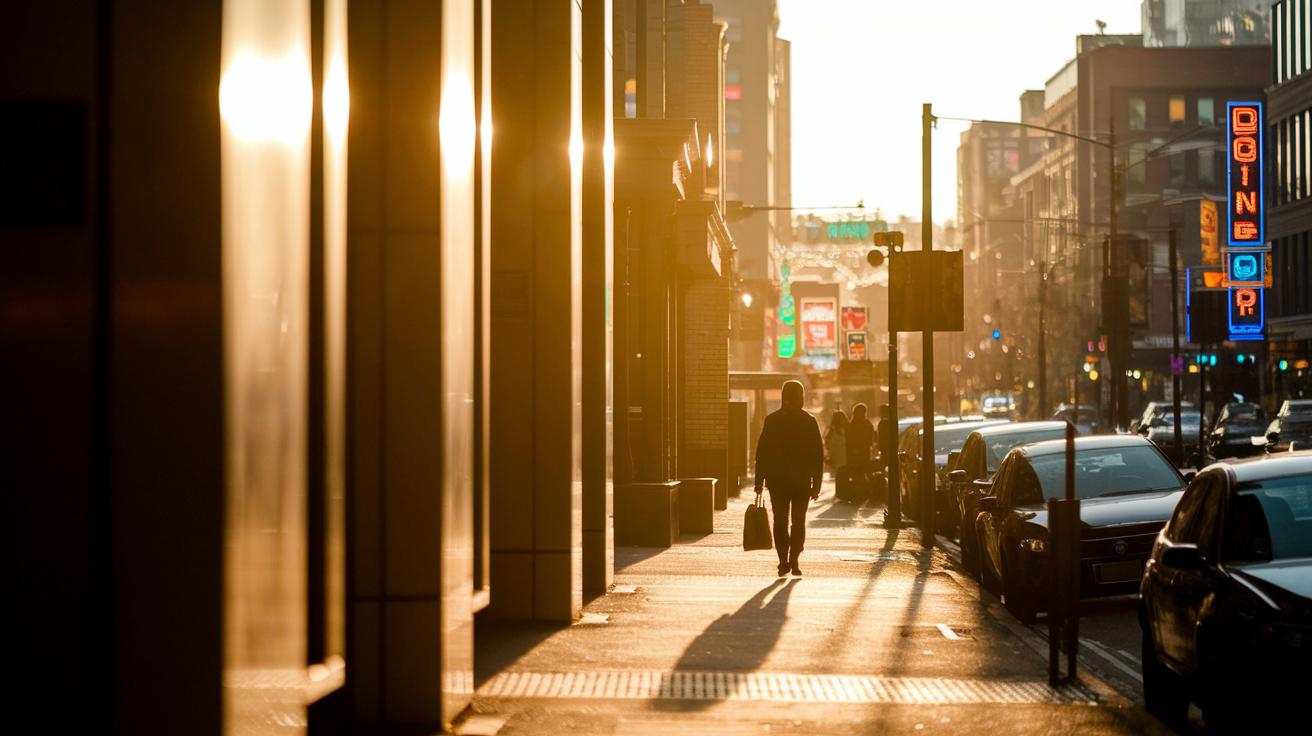
City scenes mix natural and man-made light, turning everyday moments into eye-catching photos. The golden hour lights up streets with a warm, soft glow that makes textures pop and gives a calm feel. At dusk, light pours from one side, revealing shapes and leaving long, bold shadows. Neon signs and streetlamps add bright color that works great for cool silhouettes or striking backlit shots.
In dark scenes, steady your phone by leaning it on something solid or switching to night mode. This helps cut blur and keeps details crisp. Keep your ISO low (which means your phone is less sensitive to light) to reduce digital noise, even if you have to slow the shutter speed a bit. Tap to focus on moving subjects and adjust exposure by hand when needed. Try different angles to capture how light and shadow play off each other on city streets.
Watch for reflections in windows, puddles, or glass surfaces. They add extra depth and texture to your images. Step closer or move back to get the right mix of light and shadows. With practice, these techniques can turn a simple street scene into a lively urban story full of mood and real feeling.
Try shooting at twilight, and notice how small changes in light can completely change the mood of your photos.
Mobile street photography editing tips with top apps
After snapping those raw urban moments, a bit of editing on your phone can really bring out the best in your shots. We start by tweaking exposure (brightness), contrast (the difference between light and dark), and white balance (the color tone) with easy-to-use editing tools. These simple adjustments can reveal hidden details and set the mood just right.
Give apps like Snapseed and Lightroom Mobile a try. They offer friendly sliders that let you control brightness and fine details, which helps your photos keep that true urban vibe.
Experiment a little. Cropping your pictures can sharpen the layout and straighten any tilted horizons. For a touch of nostalgia, VSCO provides film-like filters that make your images feel like they belong in a classic movie. Saving your favorite settings as presets can speed up your workflow when you're out and about.
It's worth trying different setups for different scenes, whether you're shooting under bright daylight or the warm glow of street lamps at night. A solid post-capture routine not only improves quality but also keeps the raw energy of city life alive. Keep playing with the tools and settings; sometimes, even slight tweaks can transform an ordinary cityscape into a story worth sharing.
Capturing candid urban moments with stealth mobile street photography techniques

Take a moment to really look around. Street photography works best when you note everyday patterns and let moments repeat. Keep your lens clean and set your phone to silent or vibrate. This way, you can blend into the scene. Shooting from your hip or waist gives you a natural view of daily life. For example, if you’re walking downtown and a cool scene unfolds, snap it fast.
Always keep your phone ready to capture live urban scenes. Your aim is to catch real moments without drawing attention. When you work on the go, every second counts. Bold shots can capture exciting scenes, but always respect people’s space. The magic of street life is in those genuine, unplanned moments.
Remember, being quick and prepared is key. Wearing comfortable shoes helps you move around the city and catch those fleeting moments that make urban photography special.
Mobile street photography gear guide for on-the-go shooting
A good gear setup makes street snaps dependable. We tested a high-end phone like the Pixel 9 (see our Pixel 9 review here: https://circuitcritics.com?p=234) and found it shines in low light, capturing urban scenes with great detail. Try mounting clip-on wide and tele lenses to mix up your framing and get new angles. Whether you're after a wide city view or a close-up portrait, these lenses add real flexibility.
Small add-ons can boost your mobile workflow without weighing you down. Mini tripods or grips help steady your phone in dim alleys or busy sidewalks. A light but strong grip lets you react quickly when the moment is fleeting. Keep a microfiber cloth nearby to clear the lens and keep your shots sharp. And for extra safety, add a wrist strap that helps prevent drops during quick moves.
Adding the right accessories gives you a blend of ease and performance so you're always ready for urban adventures.
Look for gear that matches your shooting style in unpredictable city scenes. Mix and match lens setups and accessories until you find what works for you. Every piece helps keep your urban photography spontaneous and clear.
Advanced mobile street photography: Nightscapes & artistic compositions

Have you ever noticed how city streets transform at night? Shift your view from daytime details to the magic of low-light urban scenes. Use your phone's manual mode to control ISO (how sensitive your sensor is to light) and shutter speed (how long your sensor captures light) for truly unique night shots. Try out long exposures to capture light trails from passing cars, this simple trick can turn a busy street into a work of abstract art.
Here are some tips to explore:
- Switch to manual settings to nail the right exposure in low light.
- Use long exposures to bring out the glow of neon lights and moving beams.
- Experiment with creative bokeh effects from urban neon signs.
- Frame sharp city silhouettes against bright, lit backdrops.
Keep experimenting to break free from ordinary daytime snapshots and let your creativity shine in the night.
Final Words
In the action, we broke down mobile street photography tips for urban scenes. We walked through how smartphones offer portable yet powerful tools to capture fleeting moments. We discussed setting adjustments, steady framing, and editing tricks that help you build a solid street photography routine.
We also touched on gear options and creative ideas that make urban storytelling more engaging. With these mobile street photography tips, your next shot is set to capture the essence of the city. Keep shooting and stay curious.
FAQ
What are some effective mobile street photography tips from Reddit and for beginners?
The mobile street photography tips from Reddit and for beginners stress keeping your lens clean, staying ready for fleeting moments, and practicing simple composition techniques to capture authentic urban scenes.
How does iPhone street photography advice from Reddit help photographers?
The iPhone street photography advice from Reddit encourages using manual controls, exploring RAW if available, and taking advantage of built-in editing apps to enhance your shots and preserve real urban moments.
What features make the best phone for street photography?
The best phone for street photography boasts strong low-light performance, quick focus, and versatile manual controls, with many pros choosing high-end models like the Pixel 9 for reliable results in varied urban settings.
How does the iPhone 16 Pro serve as a top option for photography?
The iPhone 16 Pro is favored for its advanced camera system, offering better low-light handling, manual control, and detailed post-processing options that are ideal for capturing dynamic street scenes.
What is the 20 60 20 rule in photography?
The 20 60 20 rule in photography involves allocating approximately 20% of the frame to the foreground, 60% to the main subject, and 20% to the background, helping create balanced and engaging compositions.
What are the 7 C’s of photography?
The 7 C’s of photography are clarity, composition, color, contrast, context, creativity, and consistency. They act as fundamental guidelines for evaluating and improving the overall quality of images.
What does the 400 rule in photography suggest?
The 400 rule in photography recommends using a shutter speed around 1/400 second to freeze fast movement, ensuring that dynamic urban moments in street photography appear sharp and clear.
Why turn the phone upside down for photos?
Turning the phone upside down can change the perspective and angle of incoming light, helping to reduce glare or lens flare and add an unusual twist to conventional street photography compositions.