

Have you noticed how some phone portraits look dull?
Your phone hides tricks that can turn plain photos into art.
A small change in angle or light can breathe life into a face, making every picture feel personal.
This guide shows you easy, real-world tips to boost your smartphone skills and capture vibrant portraits.
Get ready to change the way you shoot, one tap at a time.
Key Foundations for Exceptional Mobile Portrait Photography
Smartphones let you take great portraits without heavy gear. You don't need to break the bank for amazing photos. Both iPhone and Android phones offer a Portrait Mode (which blurs the background) that gives your pictures a natural depth. I tried a quick selfie in daylight and noticed that a slight angle change made my portrait pop.
These phones are light and affordable, so you can take them anywhere for spontaneous shots. You can instantly review, edit, and share your images to see your work come to life. Remember, high megapixel counts or fancy color science won't fix a bad composition; your technique is key. A simple setup can boost your creativity. For example, a presenter once caught a real moment with his subject, Alyssa, and then quickly refined the image on his phone to achieve a professional look.
Using your smartphone means you focus on framing and light, not on heavy, tricky equipment. Experiment with different lighting and angles using your phone's guide for portraits. This hands-on approach helps you blend practical shooting tips with real-world editing, setting you up for consistently stunning mobile portraits.
Mastering Lighting for Stunning Mobile Portraits
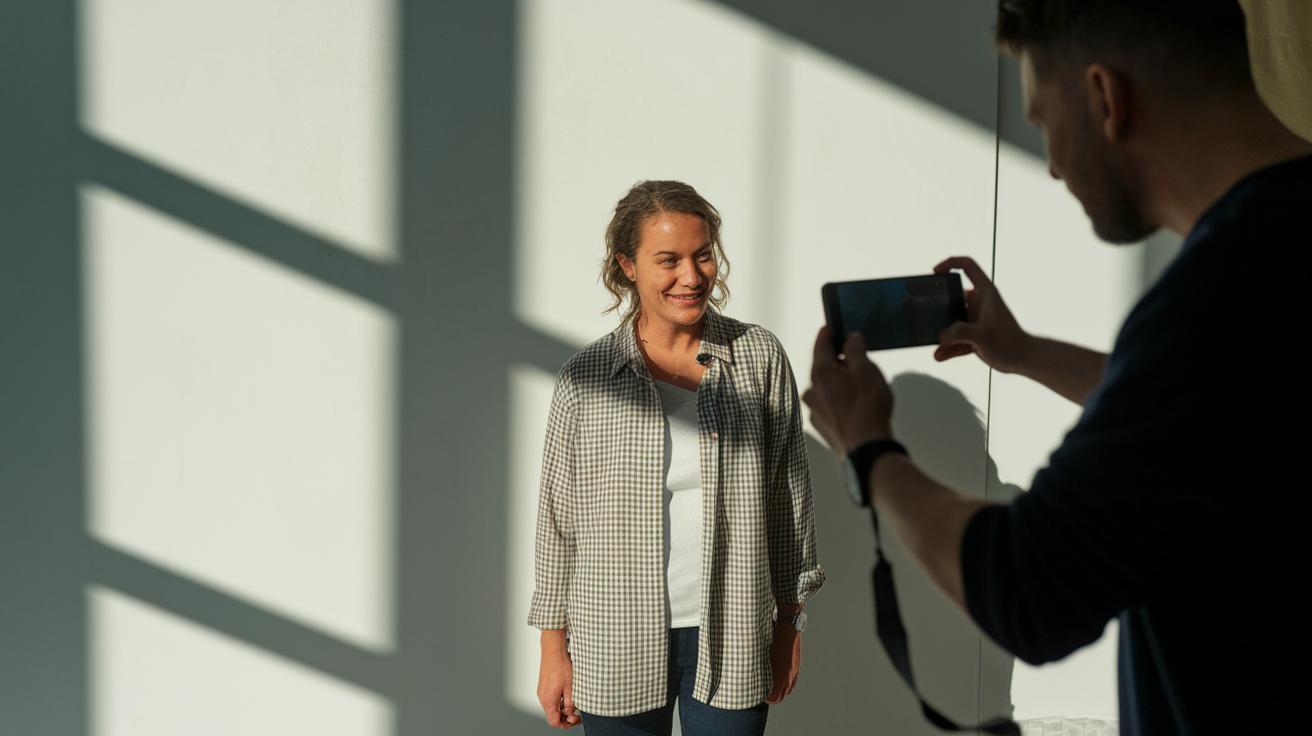
When shooting indoors, use soft, natural light from a white surface or a window with light curtains. This way, the light spreads evenly and smooths out skin details. For example, set your subject near a white wall to catch gentle light that reduces harsh shadows. It's a simple tip anyone can try.
Outdoors, look for light that is both clear and a little dramatic. Light filtering through tree leaves can create pretty patterns and add depth. If the light feels too flat, have your subject stand in the shade while facing the open sky. This trick helps balance the light and brings out natural skin tones.
For shots with backlighting, like HDR portraits taken with an ultra-wide lens, use editing settings such as increased clarity (how distinct the details are) and de-haze (reducing any foggy look) to enhance the image. Try turning the backlight into a creative tool instead of seeing it as a problem.
Avoid using flash in low-light settings because it often makes skin look too harsh. Rely on the natural ambient light, whether indoors or out, to keep colors and details looking real. Testing different settings and comparing your shots will help you find the perfect lighting setup every time.
Composition and Framing Techniques in Mobile Portraits
Grid lines can be a hidden helper. Turn them on in your phone camera, and you can easily follow the rule of thirds (dividing your picture into equal parts). This trick helps you place your subject off center for a balanced shot. For example, position your subject at one of the intersection points to naturally draw the viewer's eye.
Watch your background closely. Remove clutter or stray objects that might steal the focus. A plain wall or an overcast sky gives you a simple backdrop that makes your subject pop. Think of it as hanging a picture in a gallery. Here's a tip: tidy up your surroundings, and your subject will shine even more.
Try different angles to add life to your shots. Shooting at eye level gives a natural feel, while shooting from above or below adds depth and character. Mix up your views to capture the mood and personality of your subject. If you have a remote shooting tool like the Shutter App, use it to look at your framing before you snap the shot. A well-planned angle and balanced composition can turn a simple photo into art. Experiment until you find a style that feels right to you.
Camera Settings and Focus Control for Mobile Portraits

Your phone's Portrait mode makes a big difference when you take portraits. It blurs the background while keeping your subject clear, giving a neat, blurry effect. Instead of using digital zoom, step closer or move back to keep your image sharp.
When you tap your screen, you set the focus on your subject. This helps keep faces crisp and clear. If your phone has a manual focus option, use it to fine-tune your shot and get exactly what you want.
You can also adjust the exposure by tapping and sliding your finger. This action brightens or darkens your image to match the light around you. A balanced exposure brings out the real colors and textures in both the subject and background.
For extra clarity, try a tripod or use any built-in image stabilization your phone offers. This helps cut down on shake, especially in low light, so all the details stay sharp. Make sure you control the depth-of-field (the range of distances that appear in focus) so your images look professional.
Experiment with these settings in different lighting and outdoor spots. With hands-on practice, you can get gallery-worthy photos right from your mobile device.
Posing and Capturing Expressions in Your Mobile Portraits
Talk with your subject to help them relax. A simple, friendly question like, "How does it feel to catch a random moment?" can bring out a natural smile. These genuine expressions make your photos feel real.
Try different poses by changing hand placement and tilting the head. Even small shifts, like moving weight or a slight head tilt, can add life to your shot. I noticed that when someone casually touches their cheek during a laugh, it makes the portrait feel more authentic.
For self-portraits, set your camera on a tripod or any stable surface and use a self-timer. This lets you take the time to frame and compose your shot without feeling rushed. Monika says keeping the process fun helps even a staged self-portrait seem relaxed. In a video demo with Alyssa, more relaxed poses led to genuine expressions.
Experiment with these ideas and capture the true character of your subject.
mobile portrait photography tips: Elevate Your Shots

Open your portrait photo in the editing tool on your phone. Adjust the sharpness, contrast, white balance, and brightness to bring out the details. For example, increase contrast to make the facial features stand out, then add a bit more brightness to soften any heavy shadows.
Try using a preset like Visual Flow Modern Pack’s Hard Light. It gives your image a light boost while keeping skin textures natural. Next, use a radial gradient to add a vignette, which darkens the edges and guides the viewer's eye to the subject. Test the effect by tweaking the gradient until the subject looks naturally highlighted.
For photos taken in flat light, choose the Soft Light preset. This set-up smooths out harsh lighting and creates a more even tone. When dealing with HDR portraits, use the clarity slider to define details in the hair and eyes, and use de-haze to cut through any foggy effect.
Here are some extra tips:
| App | Use Case |
|---|---|
| Lightroom Mobile | Advanced exposure and color adjustments |
| Snapseed | Precise filter control and final touches |
| Facetune | Detail retouching for subtle features |
Make small changes and use before-and-after comparisons as you edit. This hands-on approach helps keep your photo looking natural while benefiting from a professional touch. Experiment with each adjustment until you reach the perfect balance, and remember to save different versions so you can pick the favorite final effect.
Advanced Mobile Portrait Strategies and Creative Ideas
Remote shooting can unlock fresh creative ideas. With the Shutter App, you can snap pictures on both iPhone and Android without touching the camera. This setup lets you try new positions and capture moments from angles you might normally miss.
Try shooting near reflective surfaces such as mirrors or water. For instance, a calm pond can give soft reflections that emphasize your subject's features. These natural touches help tell a clear visual story and add a surprising twist to your portraits.
Another trick is to try backlit scenes using HDR (high dynamic range, which helps balance bright and dark areas). Place your subject on a staircase with the sun behind them, and use de-haze settings to reduce glare. The end result is a dramatic image with a bold, dynamic look.
Keep your setup simple. A plain background or tidy scene puts all the focus on your subject and the light. Experimenting with unusual angles and creative lighting can really set the stage for a compelling visual story.
Even small changes in where you place your subject or pick the backdrop can turn an ordinary portrait into a captivating story. It takes your mobile photography skills well beyond the basics.
Final Words
In the action, this guide breaks down strong mobile portrait photography tips for everyday use. We showed how to use your phone’s portrait mode, control focus, and play with creative lighting to capture genuine expressions. The advice on framing, posing, and post-editing keeps the focus on technique over fancy gear. With these practical steps, you can trust your setup to deliver pleasing shots every time. Enjoy experimenting and watch your portraits come to life with confidence.
FAQ
What are some mobile portrait photography tips found on Reddit?
Mobile portrait photography tips on Reddit suggest using natural light, proper grid use, and taking advantage of Portrait Mode. These tips help you capture clear images without needing professional equipment.
What mobile portrait photography tips should beginners follow?
For beginners, start with basic techniques like using grid lines for balanced composition, working in diffused light, and manually tapping the focus point. This approach leads to sharper, more appealing portraits.
What are the best overall mobile portrait photography tips?
The best tips include mastering natural light, using grid lines to frame your subject, and selecting Portrait Mode for depth. Pair these techniques with simple editing to polish your images.
Are there mobile photography tips and tricks available in PDF guides?
Yes, many mobile photography tips and tricks PDF guides cover everything from camera settings to creative poses. They provide clear, step-by-step instructions for capturing and editing quality portraits.
How can I take portrait photos with an iPhone?
Taking portrait photos with an iPhone is easy. Use the Portrait Mode to blur backgrounds, tap to set focus and exposure, and refine your shots with built-in editing apps for a professional look.
What mobile photography ideas can beginners try for portrait shots?
Beginners can experiment with different angles, remote shooting apps, and natural expressions. These ideas encourage creativity and help you develop a unique style using just your phone.